카테고리 없음

Components - Data tables(Tables within cards)

알 수 없는 사용자 2015. 9. 6. 02:24

출처 : http://www.google.com/design/spec/components/data-tables.html#data-tables-interaction


     Tables within cards

Tables can be embedded within a card, with table navigation and data manipulation tools available at the top and bottom.

Table card with header and footer

Card title

  • 20sp Roboto Regular
  • 87% black

Card action icons (header and footer)

  • 24dp container
  • 54% black

Footer pagination labels

  • 12sp Roboto Regular
  • 54% black

Alternate headers

Some table cards may require headers with actions instead of titles. Two possible approaches to this are to display persistent actions, or a contextual header that activates when items are selected.

Alternate headers for a table card

Action buttons

  • Use borderless buttons
  • Enable upon item selection

Colored header

  • Use 50-value of secondary app color for background fill
  • Display the number of items selected
  • Display available contextual icons upon item selection

Specs

Vertical spacing

Vertical spacing of a data table card and its last row

  1. 64dp card header height
  2. 56dp height for last row
  3. 48dp data row height

Header & footer padding

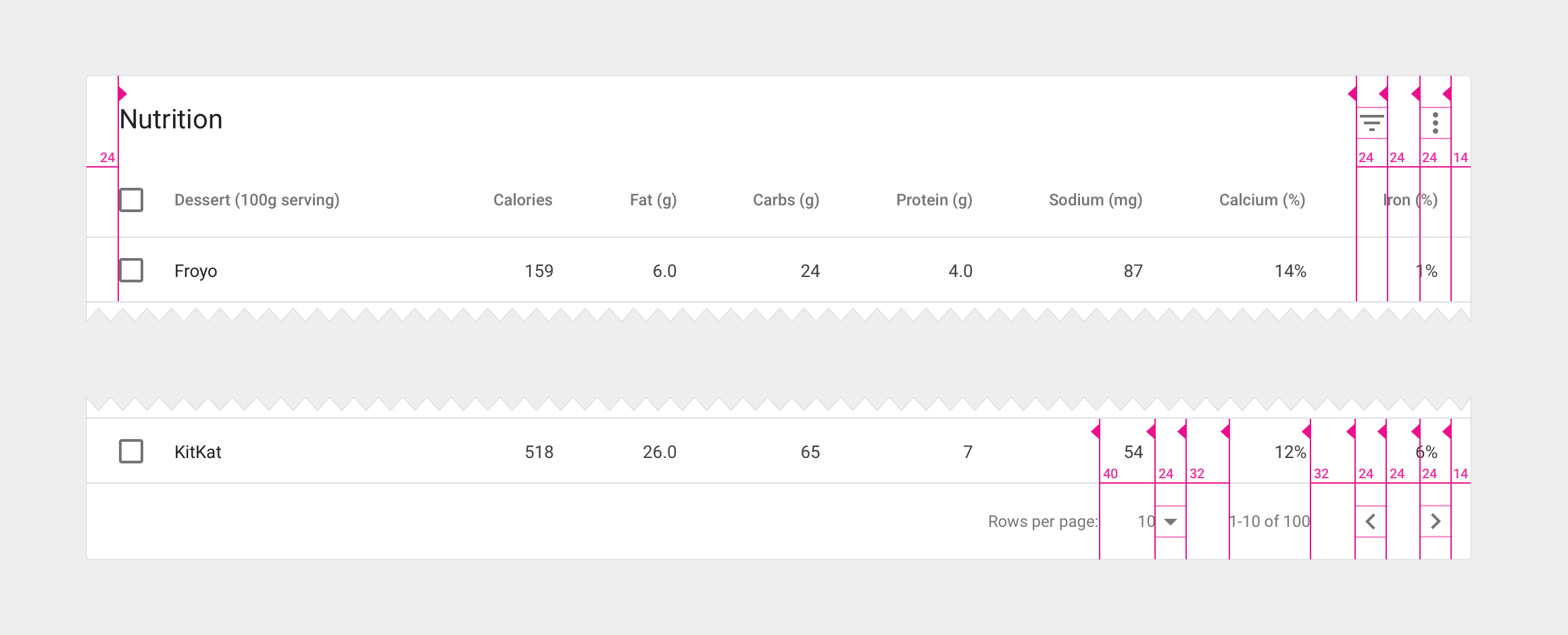
Horizontal padding between elements in a table card

  1. 24dp of padding around the perimeter of table cards
  2. 32dp in between footer control sets
  3. 40dp in between the footer row count and its label

Column padding

Padding in between columns

  1. Use a minimum of 56dp of padding in between columns. The widest item in the column (including data and column name) should delineate the column border.
  2. Checkbox icons have a width and height of 18dp within a 24dp icon container.